

How brAIn Controls Your Home
brAIn gives itself three ways to touch Home Assistant, and at first glance they look like three overlapping control panels. They’re not — they’re one brain with one set of hands, plus a toolbox your automations can reach too. This page explains what each layer is for, how they interact, and exactly where the (small, deliberate) overlap is.
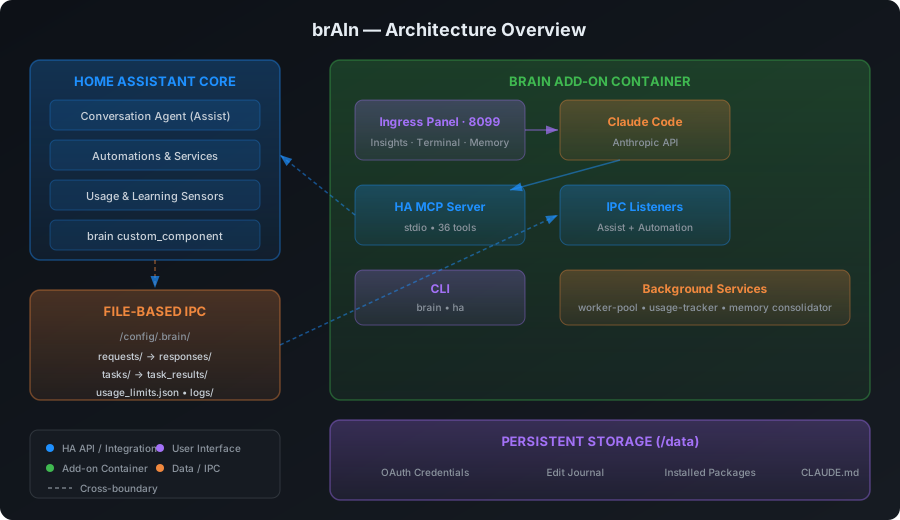
The three layers in one table
CLI tools (brain, ha) |
MCP tools | Power Tools (brain.* services) |
|
|---|---|---|---|
| What it is | Shell commands in the terminal | Claude’s live API into HA | Real HA services registered by the integration |
| Who can call it | You and Claude, in the terminal only | Claude only (chat, terminal, voice, tasks, fixes) | Claude, automations, scripts, and admin users in Developer Tools |
| What it touches | Files & workflow: YAML, logs, memory, undo, packages | Live state: entities, devices, cameras, history, registries, dashboards | Admin state: areas, labels, helpers, users, dashboards, zones… |
| Example | ha reload automations |
get_camera_snapshot, control_light |
brain.create_helper |
How they fit together
MCP is Claude’s pair of hands. Everything Claude does to your live home — reading a sensor, turning on a light, looking at a camera, calling any service — goes through the MCP server’s 89 tools. That single funnel is what makes safety enforceable: protected entities, per-agent service deny-lists, voice scoping and the tripwire are applied at that chokepoint, once, and cover everything that passes through it. What every action passes below lists the checks.
The terminal and the chat also hold a shell, which is a second route to Home Assistant. brAIn tells Claude to use the MCP tools instead, and while you have protected entities set, a service call typed as a shell command (ha service call, a curl to the services API) is refused outright and Claude is pointed at the tool that can be checked.
Power Tools are not a second pair of hands — they’re verbs installed into HA itself. Registering the 69 admin operations as real brain.* services (instead of private Claude abilities) is a deliberate choice with three payoffs:
- Claude reaches them through MCP like any other service (
call_service→brain.create_area), so the same deny-lists, protected entities and action gate apply. A voice agent at the default Voice assistant level can’t use them at all, and new agents start withbrain.*ticked under Blocked services. - Your automations and scripts get the same superpowers with no Claude in the loop — a nightly automation can call
find_orphaned_referencesby itself. - You can drive them by hand from Developer Tools → Actions, with field pickers and validation. They are admin-only: a non-admin login is refused.
CLI tools are the workshop bench, and they only exist inside the terminal. They cover the file-and-workflow side that live APIs don’t: editing and reloading YAML, tailing logs, the memory document, the edit journal, persistent packages. brAIn uses them for config work; you use them when you’re in the shell anyway.
They are two commands, split by what they act on: brain for brAIn’s own faculties (memory, findings, learn, ask, undo, own, doctor) and ha for Home Assistant operations (log, reload, entity, service, addon, notify, share, check, context). See the CLI.
So the flow for any request is:
"Label everything battery-powered and build me a guest-mode toggle"        │        ▼   Claude (terminal / voice / task)        │  MCP — the single funnel (protected entities, deny-lists, the gate)        ├── get_registry ─────────── read: which entities, which labels exist        ├── call_service ──────────► brain.add_label        (Power Tool)        └── call_service ──────────► brain.create_helper    (Power Tool)
"Fix my automations.yaml indentation and reload"        │        ▼   Claude (terminal)        ├── edits the file directly (terminal file access)        └── ha reload automations                                  (CLI tool)
The rule of thumb:
Files → CLI. Live home → MCP. Admin changes → Power Tools (via MCP).
brAIn’s generated context teaches it this routing, so you never have to think about it — you just ask.
A few verbs appear in two layers on purpose — ha service call and call_service hit the same HA endpoint, one for you at a shell prompt and one for Claude (which is told to go through MCP, because that’s where the checks live — and while protected entities are set, it can’t use the shell route at all). Collapsing to a single layer would mean either taking services away from your automations or pushing YAML editing through an API that can’t do it.
What every action passes
An action on your house isn’t one check, it’s a short series of them, each of which can only make the answer stricter. In order:
- Whether anyone may act at all. By default the terminal and the chat ask you before Claude changes anything — a command, a file, a service call. Reading is never asked about. Let brAIn act without asking turns that off for those two faces only. Scheduled work — cards, the brief, the weekly report, study — runs with Home Assistant tools that read only, so it cannot act whatever it decides.
- The tripwire. An entity you made for nothing to touch. Any attempt is refused before it reaches Home Assistant, and a security card reaches your phone at once.
- Protected entities. Refused on every face, and checked through whatever a call names: an area or device that contains one, a scene’s entity map, a script variable, and what a scene, script or automation would reach when it runs — asked of Home Assistant’s own Related answer.
- The agent’s own limits. On voice, the entities you exposed to Assist, the services
that belong to them, and that agent’s Blocked services — checked against what a call
does, so
homeassistant.turn_onaimed at a garage door is a cover call. - The action gate. From the chat, the terminal, an automation task or a fix, the action is checked against your own words in the conversation and what it would reach, worked out from the registries. It never sees what brAIn read on the way, so text planted in a device name or a calendar entry can’t argue it into anything. Your house rules are applied here; one light in the room you named goes straight through; anything broader is asked of a small, cheap model. If the gate can’t be reached you’re asked — and an unattended run is refused.
- A fix’s contract. A Fix it run may make only the service calls and edit only the
files its approved plan listed. Any other call is refused, and any shell command that
does more than read — the one exception being
brain ownon the files the plan edits.
Every service call that gets through is recorded with the state of each entity just before it, which face asked and which run it was. That record is what lets a fix’s Put them back set devices back, and what lets brAIn tell a change you asked for from one an automation made.
The full, homeowner-facing version of this — the switch, approval cards, cameras, file ownership and how to undo — is Permissions & Safety.
Claude runs take turns
Every Claude run the panel starts takes a seat in one small queue — three at a time by default — served in order of who is waiting: a safety alert first, then anything you pressed, then scheduled work, with one seat always kept free of scheduled work. So pressing Regenerate or Fix it never waits behind the overnight cards, and a burst of scheduled work can’t make the panel unresponsive.
What brAIn can and can’t reach
The goal is an instance where Claude can do essentially everything — here’s the honest scorecard:
Fully covered: entity/device control for every major domain; cameras; history and statistics; automations, scripts, and scenes (YAML + reload); areas, floors, labels; entity naming, ids, aliases, icons, visibility, and what a device shows as (a contact sensor as a door, a smart plug as a fan or a light, a sensor’s decimals and unit); helpers (all 8 types); zones; persons; users; dashboards including custom-card resources; blueprints; statistics backfill; integration enable/disable/reload and removal; device and entity deletion, including orphan sweeps that dry-run by default; repairs; logs, traces, templates; undo of any file it edited; and what it finds broken surfaces back into HA — an open-findings sensor, a brain_finding event, and an optional phone push.
Deliberately excluded:
- Adding an integration — config flows are interactive (OAuth, discovery, pairing buttons), so Claude walks you to the right screen and you click. Removing one it can do:
brain.delete_integrationdrops the config entry and reports the entities and devices that went with it. - Credentials and auth internals — API keys inside
core.config_entries, tokens, MFA. Never read, never written, never snapshotted into the edit journal. - Backing up your configuration — that’s Home Assistant’s own backups’ job. brAIn keeps an edit journal of the files it touched so
brain undocan revert one, and nothing more. - HA Core/OS updates and add-on installs — Supervisor territory;
ha addoncovers restarts and logs, but installs stay a human decision.
YAML config is not an exception
Nothing on your disk is off limits. If a dashboard, helper or person is defined in YAML
rather than through the UI, the registry service for it declines — a brain.* service
edits the registry, and a YAML-defined object isn’t in the registry. brAIn just takes the
other route: it opens the file, edits it, validates it, and reloads the domain. Same
outcome, and the same edit journal behind it, so brain undo still puts it back.
That is the routing rule doing its job, not a gap in what brAIn can reach. The only thing you’ll notice is which layer the work happened in.
What happens without Claude
Everything above is Claude with a model in the loop, on your instruction. There are a few exceptions, and each one is the narrowest thing that can do its job.
Applying a Fix it plan is mostly done by brAIn’s panel itself. The plan is a list of typed steps — change one automation, reload a configuration, call a service on named devices, rename an entity, move it to a room — and Apply carries those out with no model and no shell, through the same snapshot-and-verify path as the edits below. It stops at the first step that fails and puts back the edits it had already made. Only a step that needs Claude to work something out starts a Claude run, held to the plan’s contract. See Findings.
A press on the Proposals tab writes to /config — accepting a
proposal, or removing a one-off that has
fired — with no Claude run behind it (1.44.0). The file is snapshotted into
the same edit journal first, the change is only settled once Home Assistant is verifiably
running it, the write is reverted if it is not, and both the toast and brain undo take it
back.
Since 1.46 that write has three shapes, because what the producers need is three different things:
- Append — the ordinary case. One automation on the end of
automations.yaml, or four scenes on the end ofscenes.yaml. Everything above them is byte-for-byte what you wrote. - Edit one entry — a condition proposal changes an automation you already have. brAIn replaces exactly the bytes of that one entry and every byte outside it is identical afterwards: your ordering, your comments, your quoting and every other automation in the file. It refuses rather than guessing where the entry ends — an id that appears twice, a file that is not a top-level list, an entry that cannot be cut on a line boundary — because nearly-right bytes are your file with a hole in it.
- Remove one entry — the same splice with nothing written in its place, and it has exactly one caller: the Remove button on a one-off intent that has fired. Nothing in brAIn removes an automation on its own.
brain undo covers all three, because all three snapshot the whole file into the same journal
before touching it, in the same line shape a Claude edit writes. What comes back is the file
as it was, not a reversal computed after the fact — so an undo of an edit puts your comments
back too.
An accepted emergency playbook is then run by Home Assistant, not
by brAIn — it is an ordinary automation in your automations.yaml once you have accepted it,
and brAIn has no path that fires one. It is composed deterministically from your registries
rather than by a model, every entity it would act on is listed on the card before you accept,
and no playbook ever unlocks a door or disarms an alarm.
Overnight self-healing is the one thing brAIn does to your house with nobody’s press behind it, and it is off by default. Switched on, it does three things and no more — starts an add-on that was set to run at boot, pings a dead Z-Wave node, reloads a config entry that failed to set up — once a night, inside your quiet hours, at most three a night, never on a protected entity and never on a finding you have already answered. There is no Claude run anywhere on that path.