

Findings
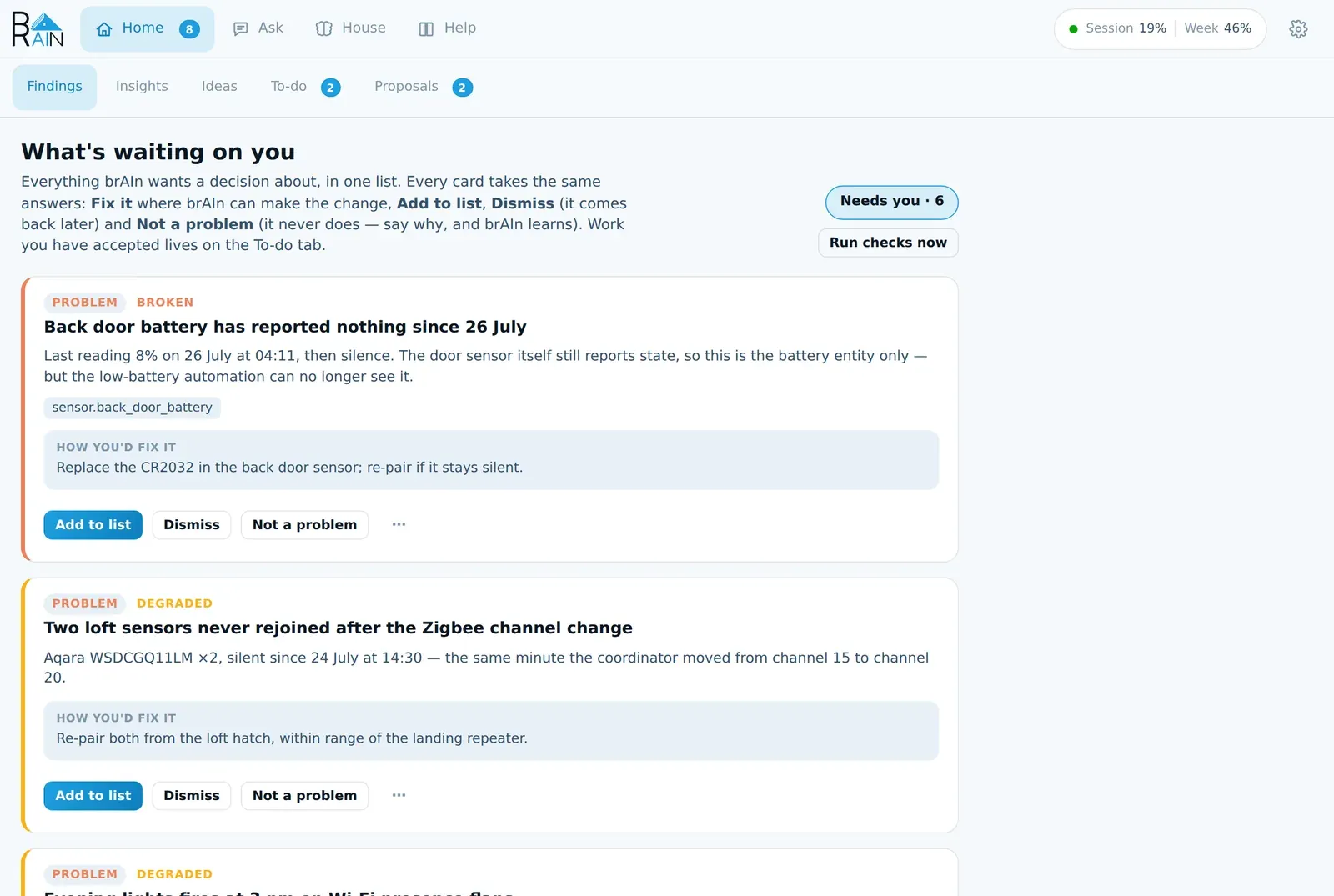
Home → Findings is the list of everything brAIn wants a decision about. Mostly that’s something broken — a dead battery, a sensor that stopped reporting, an automation that can never fire — but a guess brAIn wants confirmed lands here too, because answering either is the same job: a question only the person living there can answer.
Suggestions — a habit worth automating, a playbook, a set of scenes — are not on this list. They live on the Proposals tab, with all their evidence, and that tab has its own badge. The Findings badge counts only what is waiting on a decision about the house.
You never have to ask for them. Findings come from brAIn’s house checks (which cost no tokens), from insight runs and study sessions, from the overnight health check, and from the Resident — the loop that watches your house and decides what is worth your attention.
At the top of the feed is one line about what the house is doing right now — home,
away, settled for the night, waking up, guests or not sure — with the rooms in use
and anything unusual together. Every number and device it names has to be something brAIn
could actually see, it never says anything about anybody’s health or sleep, and a picture
it could not refresh reads not sure, never nobody’s home. The same reading is
sensor.brain_house in Home Assistant. Under that line, Calendars brAIn may read lets
you tick a calendar so its next three days (“Mum staying Fri–Sun”) are taken into account;
none is read until you tick one, and what a calendar says is treated as information, never
as an instruction.
What a finding looks like
These are the kinds of thing that turn up in a real house:
- A sensor that died quietly. “Back door battery has reported nothing since 26 July. Last reading 8% at 04:11. The door sensor still reports, so this is the battery entity only — but your low-battery automation can no longer see it.”
- An automation that can never fire. “Morning lights triggers on a motion sensor that was renamed three weeks ago. It has not run since.”
- A device that came back wrong. “Two loft sensors have been silent since 24 July at 14:30 — the same minute your Zigbee coordinator moved from channel 15 to 20.”
- Tidy-up. “13 entities belong to devices that no longer exist.”
Every card names the thing by the name you know it by (the entity id is in a tooltip), says how bad it is, gives a sentence or three of why, and one line of what to do — headed How you’d fix it when it needs your hands, or How brAIn would fix it when software can make the change. Why brAIn thinks so, folded under the card, shows what it actually read, how sure it is, and what looked at the finding before you did.
The same problem is never raised twice
Findings are deduplicated by meaning, not wording, and everything you’ve answered is remembered — so a problem you’ve dealt with doesn’t come back in new words.
Something looks at it before you do
A house check is one rule reading one instant. A sensor that hasn’t moved in a week is stuck — or it’s a contact on a cupboard nobody opens. So nothing a check raises goes straight to you. It becomes a signal for the Resident, alongside a short list of events it watches live (somebody arriving or leaving, a protected entity moving, a reading far outside its own normal, a person putting back what an automation just did).
- The first look. Every ten minutes, or straight away when something urgent happens, one cheap run reads the batch and says, per signal, ignore, watch, investigate or act. It sees your local time and weekday. A leak, smoke, gas, a freeze or anything on your protected list can never be ignored, whatever it answers.
- The investigation. Investigate buys a stronger run with read-only Home Assistant tools — history, statistics, the logbook, traces. When it was sent to look at a card that’s already on your list, it rewrites that card: what is really going on and what to do about this device in this house, instead of the rule’s generic sentence. If it finds nothing worth your evening, it holds the card back with its reason, under the Looked at filter, where you can put it back. It never files a second card beside the first.
- A second opinion can say no. When an investigation is unsure about something that matters and a stronger model looks again, that model sees the first conclusion and may withdraw it.
- Silence surfaces. If the look fails or skips a row, the finding comes to you anyway, saying it wasn’t checked first. If brAIn can’t look at all — not signed in, automatic runs paused, the budget spent — findings wait for the next look rather than being shown unchecked.
- Watching means watching. Something the Resident decided to keep an eye on comes back after it happens three more times, counted across days.
- A held card that gets worse is looked at again — a battery held back at 30% comes back for another look at 4%.
- Cards age out. A Resident card nobody answers leaves the list on its own after a week, a fortnight or a month, depending on how much it matters. Safety cards never expire.
The line under the feed says what the day cost — “Looked 96 times today, investigated 3, changed nothing. Watching 6.” — so a quiet feed and a loop that has stopped never look the same.
It learns from your answers
Every call the Resident makes is written down, and once a day brAIn checks each one against what you did next: Not a problem, I’ve fixed it, Add to list, putting back something it held, a problem it passed over turning up within three days, or undoing a fix. Where the record is lopsided — four hall-motion cards at 3 am all marked Not a problem with “it’s the cat” — a cheap nightly run writes a short judgement that the next look about that sensor reads. The counts in it are brAIn’s own arithmetic, not the model’s. A judgement never makes brAIn quieter about a leak, smoke, gas, a freeze or anything protected, never mentions people, goes away the moment a later card on the same thing turns out to be real, and shows on the Knowledge tab where you can forget it. Each look is also shown a handful of brAIn’s earlier calls on similar things, and how they turned out.
Leaks, smoke, CO and gas don’t wait for any of this
A tripped detector is sent by code, the moment it trips
When a moisture, smoke, carbon-monoxide or gas sensor goes from clear to detected, brAIn files a critical card naming the sensor and the time and sends it straight away — through quiet hours, with reminders behind it. No model is asked first, and none of the things that pause brAIn’s thinking can hold it back: not being signed in, automatic runs being paused, the usage budget being spent. With no notification service set, it lands in Home Assistant’s own notifications instead.
- One card per trip. Dismissing Tuesday’s leak doesn’t silence Friday’s. A detector chattering on and off within five minutes is still one card.
- When the sensor reports clear, the card says so and the reminders stop — but the card stays until you answer it, because water that dried by itself still came from somewhere.
- The Resident looks afterwards and may add what it finds to the card. It never decides whether you hear about it.
The instant alert keys only on the device class Home Assistant gave the sensor. If brAIn reads a binary sensor nobody classified as a leak sensor, it watches it closely and looks at it first — but it can’t ring your phone on brAIn’s word alone.
One row of answers
Every problem card offers the same answers, in the same order, so you can read the row without reading the words:
| Button | What you’re saying | What happens |
|---|---|---|
| Fix it | brAIn, sort this out. | Only where software can make the change. brAIn works out the exact steps and shows them first; nothing changes until you press Apply. |
| Add to list | It’s real and I’ll get to it. | The card moves to the To-do tab and brAIn stops raising it while it waits there. |
| Dismiss | Not now. | Nothing is recorded. brAIn brings it back later if it’s still true — a day for something serious, a week for a tidy-up — and tells you when. |
| Not a problem | You’ve got this wrong, or it’s normal here. | Settled for good. A box asks why (optional) — and that sentence is what brAIn learns from. |
A flat battery never offers Fix it, because inventing a software substitute for a dead CR2032 is worse than saying so. A battery you charge rather than replace — a phone, a robot vacuum — says Charge it instead of telling you to buy one.
The other kinds of card use the same shape with their own words:
| Card | Its answers |
|---|---|
| A guess — “The garage fridge is meant to run 24/7 — right?” | Yes · No · Dismiss |
| A plan waiting for you | Apply · Don’t change it · Not a problem |
| A change brAIn made | Got it, Undo the fix, and Put them back where the fix made service calls |
Questions sit just under the high-stakes problems, so they don’t sink below a pile of warnings. Dismiss on a question puts it to sleep: it stops counting against the three-question limit, so brAIn can ask something else meanwhile, and comes back later.
Once brAIn has tried a fix, the card shows what the run concluded and what it changed. A fix that came back saying it needs you leads with your own presses rather than another plan; one that failed says so, with Try again behind the ⋯.
The rarer presses live behind ⋯ on each card: I’ve already fixed it, Check again, Talk about it, Stop raising these, and a few more. Stop raising these isn’t offered on the Resident’s own cards or on safety cards — the Resident isn’t one rule you can mute, and what you mean on one of its cards is Not a problem, with the reason.
Fix it: a plan first, then your yes
-
Press Fix it. brAIn looks — read-only, it cannot change anything at this step — and comes back with a plan made of exact steps, plus one sentence on what could go wrong in your house.
-
Read the plan on the card. Each step is one of a small set: change one automation, reload a configuration, call a service on named devices, rename an entity, or move something to a room. The words are written by the code that will carry the step out, not by Claude, so what you read is what runs. A change to an automation shows the exact lines that will change and how often the old and new versions would have run over the last week. Don’t change it leaves the finding exactly as open as it was, and keeps the plan so reading it again costs nothing.
-
Press Apply. brAIn’s panel makes the plain steps itself — no model, no shell — and stops at the first one that fails, putting back any edits it had already made. Only a step none of those can describe starts a Claude run, and that run may touch only the service calls and files the step listed.
-
The card turns into a change for you to read, with what was touched. Got it clears it.
FINDING   Morning lights can never fire          Its trigger references binary_sensor.hall_motion_old,          renamed to binary_sensor.hall_motion on 8 July.
Fix it →  PLAN          1. Change automation "Morning lights" (automations.yaml)               - entity_id: binary_sensor.hall_motion_old               + entity_id: binary_sensor.hall_motion             Last 7 days: old version would have run 0 times, new 11          2. Reload automations          Risk: none — the new sensor reports the same states.
Apply →   Edited /config/automations.yaml · Reloaded automations          Trigger now resolves
          1 file changed · Undo the fix · Got it
It’s bounded on purpose: one finding per run, it never deletes anything it didn’t create, never restarts Home Assistant, never touches secrets or anything on your protected list, and nothing runs until you press it. One step brAIn won’t take means no plan at all — a step on the card that would quietly not happen is worse than no plan. An action gate checks every action against what you asked for; see Permissions & safety.
Putting it back
- Undo the fix puts back every file the fix edited and reloads Home Assistant. Every
file was snapshotted first, so
brain undocan put it back too. - Put them back is for the service calls a fix made, which Undo lists rather than reverses (undoing a call is acting on your house again). It sets those devices back to how brAIn recorded them just before the fix, reads each one again, and tells you per device whether it’s back. It never unlocks a lock, disarms an alarm, or opens a garage, door or gate, it never touches a protected entity, and brAIn never presses it itself.
brAIn checks its own fixes
Three minutes after a fix, brAIn re-runs the check that found the problem. If it’s still there, the card comes back saying the fix didn’t hold, instead of sitting under fixed.
Then it looks again after a day, a week and a month: has the automation run, does the sensor read what it should, has the check stopped finding it. Where that’s arithmetic no model is used; otherwise a cheap look runs, gated like every scheduled run. Each look answers held, came back or could not check — and “could not check” never counts as the fix having worked. A problem that comes back reopens its card and says which fix it came back from. One that comes back a second time becomes a suggested maintenance interval (“about every 11 days”), not a third fix.
Not a problem: the answer that teaches
When a finding is wrong about your house, say so — and say why:
“That’s a contact on a cupboard nobody opens. It’s supposed to read closed.”
That sentence goes into memory as a correction and into every future analysis, and on a house-check’s card it tells that rule to stop making the same mistake about that entity. The box is optional — “not a problem here” needs no essay — but the reason is what stops brAIn making the same mistake in new words.
How far a correction reaches, and for how long
brAIn reads your reason and works out what you meant:
- How far — just this rule on this device (the usual case), anything about this device, this rule for every device in the room, or this rule everywhere. Anything wider than one device is asked as a question on the Findings list first, and nothing changes until you say Yes.
- How long — until a date, until a month, until a season is over, or for good. “It’s always like that in winter” stops it until spring.
A correction never covers a smoke, gas, CO or leak sensor, a lock, an alarm panel, anything on your protected list, or the freeze check — even one added to that room later. Undo, or Let brAIn raise it again, takes back everything the correction wrote.
If a whole kind of finding is wrong for your house, ⋯ → Stop raising these mutes that check entirely.
Only “Not a problem” is for ever
I’ve already fixed it, Got it after brAIn fixed something, and finishing a to-do made from a finding stop it being raised for as long as it stays fixed. A house check’s problem is raised again if the check finds it again — the card says how long it stayed away — and anything else after ninety days.
Talk about it first
⋯ → Talk about it opens a new conversation in Ask, beside whatever you were doing — an answer being written in another chat carries on. It starts with the case’s evidence, how sure brAIn was and what its investigation said, and asks whether it really is a problem here.
- It asks before it changes anything. Claude can read anything, but every service call, file edit or shell command shows a permission card first — even with Let brAIn act without asking on.
- It offers the endings as buttons. When Claude has finished looking, it offers the ways the finding could actually end — “Replaced the CR2032”, “That cupboard is never opened” — and pressing one settles the finding in those words. Nothing is settled until you press.
- An agreed change becomes a plan. When you and Claude agree what to change, it can offer that as a button. Pressing it has brAIn plan exactly that change, read-only, and put the plan on the card. Nothing happens until you press Apply, and Undo puts it back.
The to-do list
Home → To-do is the work you’ve accepted, plus anything you add yourself.
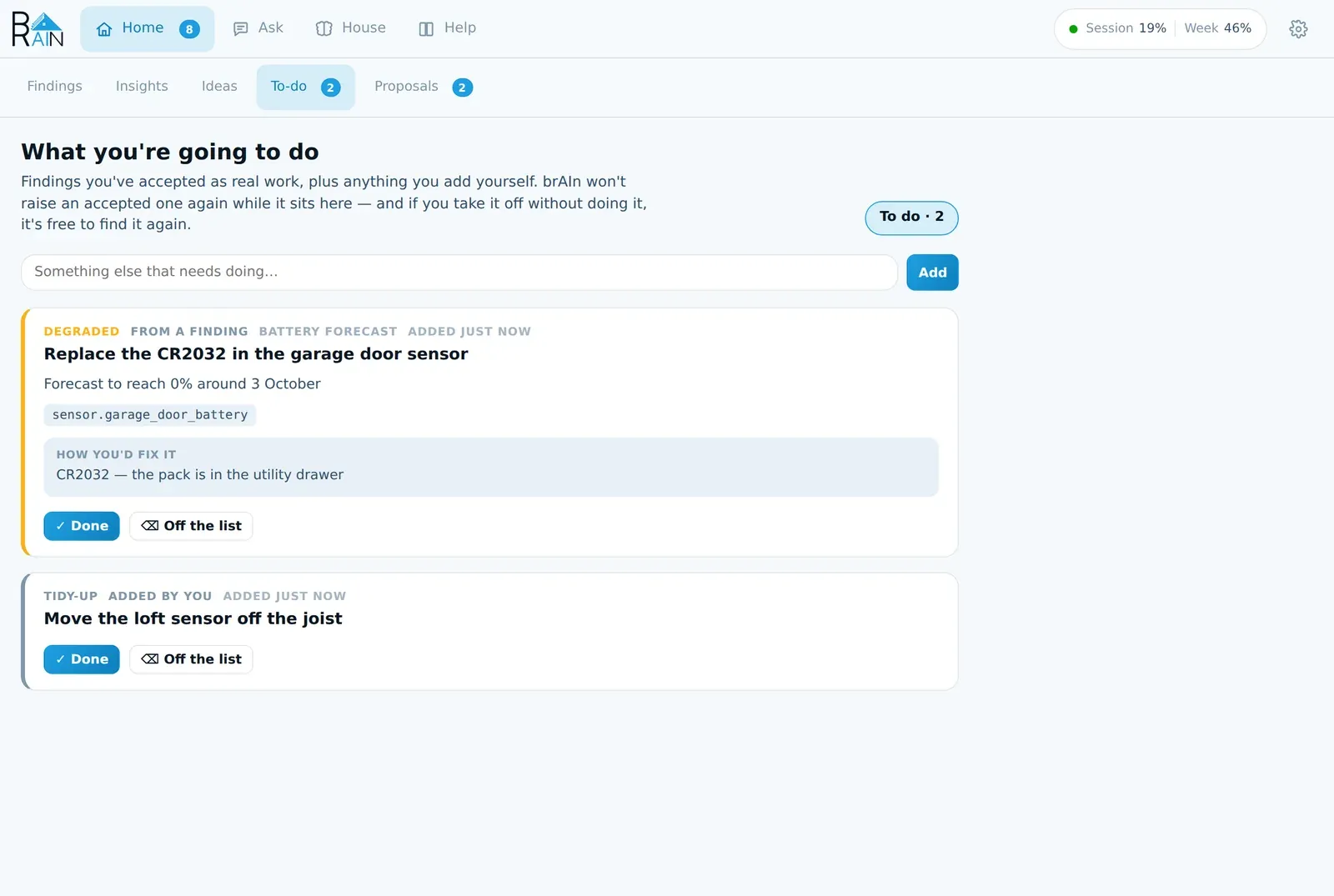
- ✓ Done — it’s sorted. brAIn writes it into memory now (“Replaced the garage door sensor battery”), and the box asks what you did, optionally.
- ⌫ Off the list — you’re not going to do it. A chore that came from a finding is then free to be reported again if it’s still true.
The same list appears in Home Assistant as todo.brain_system_brain, so ticking it off in the To-do
app counts, and brain.add_todo adds to it from an automation.
Notifications
Set findings_notify_service to one of your notify.* services and findings reach your
phone in tiers:
| Tier | What you get |
|---|---|
| A tripped leak, smoke, CO or gas detector | Sent by code the moment it trips, through quiet hours, whatever else brAIn is doing — see above. |
| Critical and urgent — a freeze, a hub that stopped answering | Pushed at once, even in quiet hours, and asked again after an hour, four hours and twelve hours. Any answer stops it. |
At or above findings_notify_min_severity (default critical) |
Timed and worded for your lock screen — see below. |
| Everything else | No message — it’s on the tab, in todo.brain_system_brain and in Repairs. |
Tell it what deserves a notification
⚙ → Insights → What deserves a notification takes one sentence in your own words:
“Wake me for water, smoke, the freezer or the front door at night; batteries can wait for Saturday.”
Before brAIn sends anything in the middle tier, it reads that sentence, the time, your quiet hours and what it sent you in the last day, and decides: send it now, hold it until a time that suits (up to a day and a half), put it on the next morning’s list, or leave it on the Findings tab. It writes a short title and a line you can act on without opening anything — “Garage freezer is 6° warmer than a month ago — check the seal” rather than “brAIn found a problem”.
It can’t touch the tiers above: anything escalating never goes through it, a critical finding is never left off your phone, and a message may only name the device it’s about. If brAIn can’t ask Claude (no sign-in, automatic runs paused, the budget spent, an answer it can’t read), it sends exactly what it always did.
What brAIn learns from your swipes
Every notification is recorded with what happened to it: a button pressed, swiped away (Android reports this; iPhone doesn’t), or left alone. ⚙ → Diagnostics shows the week’s count. Once a week, if nearly every notification about one device or one check has been dismissed or swiped away unanswered (8 of 10 or more, over at least eight), brAIn asks on the Findings feed: move these to the morning list? Yes adds one line to your sentence — listed under the box in ⚙ with a Remove beside it. No is remembered and it won’t ask again. Critical and safety alerts are never counted, and nothing changes until you answer.
Quiet hours, and saying it aloud
Between notify_quiet_start and notify_quiet_end (22 to 7 by default, in your home’s
timezone) only urgent ones get through. Everything else is held, not dropped, and
anything you fixed or dismissed overnight is dropped from the queue rather than announced.
⚙ → Advanced → Say urgent problems aloud (off by default) also announces a serious, urgent problem from a house check on the voice satellite in the room where motion was just seen. It never speaks to an empty house, during quiet hours, for something already escalating on your phone, in words that name a person, or through a protected speaker. It only announces; answer it on your phone.
Answering from outside the panel
Your phone. On the companion app a notification about one finding carries its answer buttons, and tapping it opens brAIn’s panel. Reply does more than ask a question:
| You type | What happens |
|---|---|
| “It’s always like that in winter” | Not a problem, until spring. |
| “Remind me tomorrow” | Dismissed until tomorrow. |
| “I already replaced it” | Marked fixed. |
| “Is the loft sensor definitely dead, or just asleep?” | brAIn looks into it and answers in the next notification. |
When a reply ends a card you get one line back — “Got it — I’ll stop flagging it until March.” — with an Undo button that puts everything back for five minutes.
Repairs. Every finding that’s waiting on you also appears under Settings → System → Repairs, with the same answers as its card. Answering there is answering on the tab.
Automations. sensor.brain_findings_open_findings holds the count, the severity split and the
texts. Events fire as things change: brain_case when something new needs a decision,
brain_case_ended when it’s answered, and brain_change when brAIn changed something in
your house. A restart doesn’t replay them, and Dismiss isn’t an ending: a dismissed card
doesn’t fire brain_case_ended, and its return isn’t announced as a new case.
Why didn’t brAIn tell me?
brAIn keeps a short record of every time it decided not to say something, and why: a check that went quiet because too much looked wrong at once, a report you’d already answered, a correction you gave, a rule you muted, a message held for quiet hours, a run the budget wouldn’t pay for, or a first look that let it go. Ask in the bar:
Why didn't you tell me the garage was open?brAIn answers from that record, with the traces and logbook behind it. If there’s no record, it says so — that means it may never have seen it, which is a different answer from choosing to stay quiet.
A wrong press has an Undo
Every press that takes a card off the list leaves an Undo in the toast for about five minutes, and it puts back everything the press did — the card, the “never raise this again”, the line queued for memory and any rule a correction wrote. After a fix, Undo the fix and Put them back on the card are the durable versions.
Filters
- Needs you — the default: everything waiting on a decision.
- Dismissed — what you’ve put off, each showing when it comes back.
- Looked at — what the Resident decided wasn’t worth your evening, with its reason on every row and Bring it to the front to put one on the list.
- Answered — what you’ve settled, with one button: Let brAIn raise it again.
Under the filters, a scorecard shows how right each source of findings has been in your house, once it has a few answers — Device check: 9 of 10 confirmed.
From the terminal
brain findings in the terminal is the same list as text:
brain findings # list what's waitingbrain findings fix 1786715730 # ask for a plan — changes nothingbrain findings apply 1786715730 # carry out the planbrain findings undo 1786715730 # put back the files a fix changedbrain findings done 1786715730 "replaced the CR2032"brain findings wrong 1786715730 "that sensor is meant to sit closed"brain findings snooze 1786715730 week # hour | tomorrow | week | month | nowEverything goes through the panel’s own API, so an answer from the terminal teaches brAIn exactly what the same button would.